
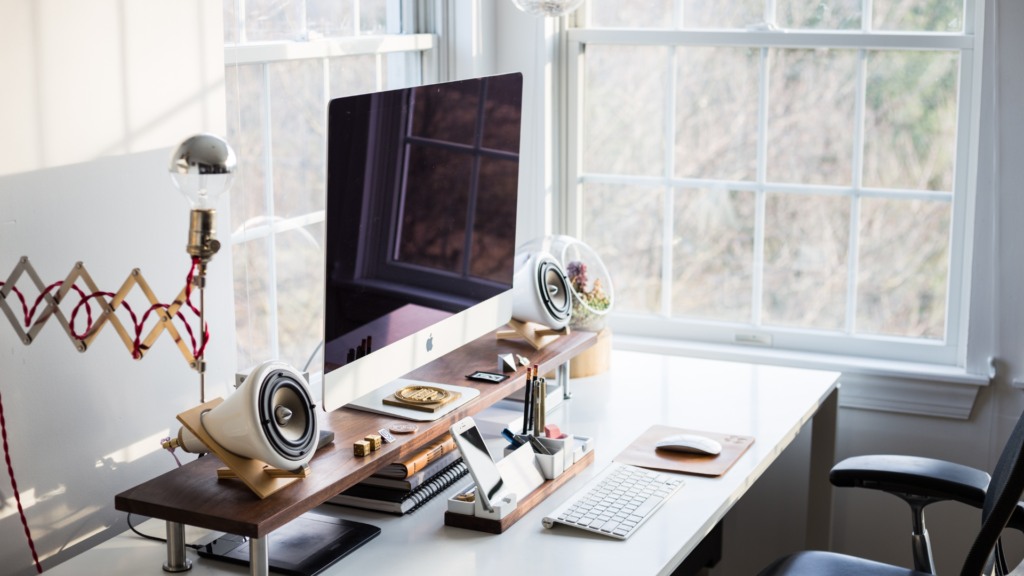
Creating a fully automated home office can transform the way individuals approach remote work. By integrating smart technology and streamlining daily tasks, they can significantly enhance productivity and maintain a healthy work-life balance. This automated setup allows for seamless transitions between work and personal life, reducing stress and increasing efficiency.
In a world where working from home is becoming the norm, automating the office can provide a competitive edge. From smart lighting and climate control to automated scheduling and reminders, these tools facilitate a more organized and conducive working environment. Individuals can focus on their work without the constant hassle of managing their surroundings.
Implementing automated solutions not only saves time but also empowers individuals to create a personalized workspace that meets their unique needs. Embracing this approach can lead to improved satisfaction and output in both professional and personal realms.
Designing Your Home Office Space
Creating an efficient home office space involves careful consideration of furniture, lighting, and personal touches. Each element contributes to a productive and comfortable environment, enhancing both focus and creativity.
Choosing the Right Desk and Chair
Selecting a desk requires attention to size and functionality. A standing desk can offer flexibility, allowing users to alternate between sitting and standing. Desk height is crucial; it should align with the chair to ensure comfort and proper posture.
An ergonomic chair supports the user’s back, reducing strain during long hours. Look for adjustable features such as seat height, lumbar support, and armrests. Ideally, the chair should promote a natural spine alignment for health benefits.
Consider storage options as well. Desks with built-in drawers or shelves can keep essential tools organized, minimizing clutter in the home workspace.
Balancing Natural and Artificial Lighting
Maximizing natural light is essential for a productive atmosphere. Positioning the desk near windows can enhance mood and focus. Natural light also reduces eye strain, contributing to a healthier work environment.
Artificial lighting should complement natural light. Use adjustable lamps with warm light settings to create a comfortable ambiance. Desk lamps provide focused light for tasks, while overhead lights offer general illumination.
If you’re considering ways to increase natural light in your workspace, working with sunroom contractors can be a game-changer. Sunrooms provide an abundance of natural light, making them an excellent choice for creating a bright, inspiring home office. The blend of sunlight during the day and well-placed artificial lighting ensures your workspace remains productive and inviting at any time.
Another option is to incorporate smart bulbs that allow for brightness adjustments throughout the day. A blend of lighting types can better suit tasks and personal preferences, fostering a pleasant workspace.
Incorporating Personal Touches
Personal touches make the office uniquely inviting. Incorporate indoor plants to promote a calming atmosphere and improve air quality. Plants like succulents or pothos are low-maintenance options that thrive indoors.
Decorative elements such as artwork or motivational quotes can inspire creativity. Consider a bulletin board for displaying personal achievements or reminders.
Maintaining a balance between professional needs and personal style enhances the enjoyment of the workspace. Thoughtful decorations can make the home office feel warmer and more engaging, fostering a better work-life balance.
Integrating Technology and Automation
A fully automated home office relies on reliable hardware, robust internet connectivity, and smart office devices. Each component plays a crucial role in enhancing productivity and ensuring a seamless work environment.
Setting Up Reliable Hardware
A dependable computer serves as the backbone of the home office. It should have sufficient processing power and memory to handle various tasks efficiently. Choosing a laptop stand that promotes ergonomic posture helps maintain comfort during long working hours. An ergonomic keyboard can significantly reduce strain on the wrists, leading to improved productivity.
Incorporating a high-quality printer is essential for those who need physical documents. Many modern printers also support wireless printing, streamlining the workflow. Noise-canceling headphones or headsets can create a focused atmosphere, eliminating distractions from the surrounding environment.
Optimizing Internet Connection
High-speed internet is a fundamental requirement for any automated home office. It supports smooth video conferencing, file transfers, and access to cloud storage services like Evernote. A reliable router is crucial; it should be positioned centrally to ensure maximum coverage.
However, if you encounter weak signals, additional tools can help. For instance, using Antennas and signal boosters can enhance your internet connection by improving cellular signal strength, which is especially useful if you rely on 5G hotspots for connectivity. Similarly, a Wi-Fi extender can eliminate dead zones and ensure consistent coverage across your home.
In cases where stability and speed are critical, consider switching to a wired Ethernet connection. Connecting your computer directly to the network often provides faster and more reliable performance than Wi-Fi. Moreover, to maintain optimal connectivity, it’s also a good idea to regularly test your internet speed so you can identify and address potential issues before they disrupt your productivity.
Investing in Smart Office Devices
Smart office devices enhance functionality and streamline tasks. Smart plugs allow for programming or remote control of essential electronics, such as lights or printers. A smart thermostat can help maintain a comfortable environment by adjusting temperature based on occupancy.
Automation software, like task managers, improves organization and efficiency. Tools that integrate with cloud storage services facilitate easy document access and sharing. Automating repetitive tasks reduces workload and allows individuals to focus on more strategic activities.
Managing Your Workflow
Creating an efficient workflow is crucial in a fully automated home office. It centers on optimized task management and effective collaboration, enhancing productivity and supporting mental health in a remote setting.
Implementing Task Management Systems
Task management systems are vital for organizing and prioritizing work. They help individuals assign tasks, set deadlines, and monitor progress. Popular tools like Trello, Asana, and Monday.com provide intuitive interfaces for creating lists and tracking projects.
Key features to consider:
- Task Assignment: Designate responsibilities to team members.
- Progress Tracking: Use visual indicators to show task completion levels.
- Automated Reminders: Ensure deadlines are not missed with automated notifications.
This structure allows for regular reporting, helping teams stay aligned and focused on their goals.
Facilitating Virtual Meetings and Collaboration
Virtual meetings are essential for maintaining communication in remote work environments. Employing video conferencing tools like Zoom or Microsoft Teams can enhance engagement during discussions.
Important considerations include:
- Scheduled Meetings: Establish a clear routine by setting regular meetings to discuss updates.
- Collaboration Tools: Incorporate platforms like Slack or Google Workspace for real-time communication and file sharing.
- Meeting Agendas: Prepare specific agendas to keep discussions focused and productive.
Engaging in regular virtual meetings promotes teamwork and supports employees’ mental health by reducing feelings of isolation.
Enhancing Your Office Environment
Creating an efficient office environment involves optimizing storage and ensuring good air quality. These elements contribute significantly to productivity and comfort in a fully automated home office setup.
Effective Storage Solutions
An organized workspace can enhance focus and efficiency. Implementing effective storage solutions is key. Consider using desk organizers to keep everyday items like pens, notepads, and cables neatly stored and easily accessible.
Utilize vertical space with shelves or wall-mounted racks to maximize storage without consuming desk space. A filing system can be essential for managing documents. Whether digital or paper, categorize files for quick retrieval.
Use labeled bins for miscellaneous items to avoid clutter. Place a stylish desk lamp on the work surface to provide task lighting while enhancing décor. Opting for multi-functional furniture such as a credenza cabinet can also help save space and maintain an organized environment.
Maintaining Air Quality
Good air quality is essential for a healthy office atmosphere. Regular ventilation is crucial; opening windows when possible can help. An air purifier can remove pollutants and allergens, ensuring clean air circulation.
Plants can also enhance air quality while providing a calming effect. Consider low-maintenance options like snake plants or peace lilies. Utilizing ambient lighting can create a relaxing workspace, promoting well-being.
Setting a consistent routine for cleaning can help maintain air quality and overall office hygiene. Regularly changing the filters in HVAC systems or purifiers is vital. Investing in air quality monitors can keep track of indoor conditions, prompting necessary adjustments.